
 See the details →View details →
Joyful invites ✦ Instant downloads
First birthdays
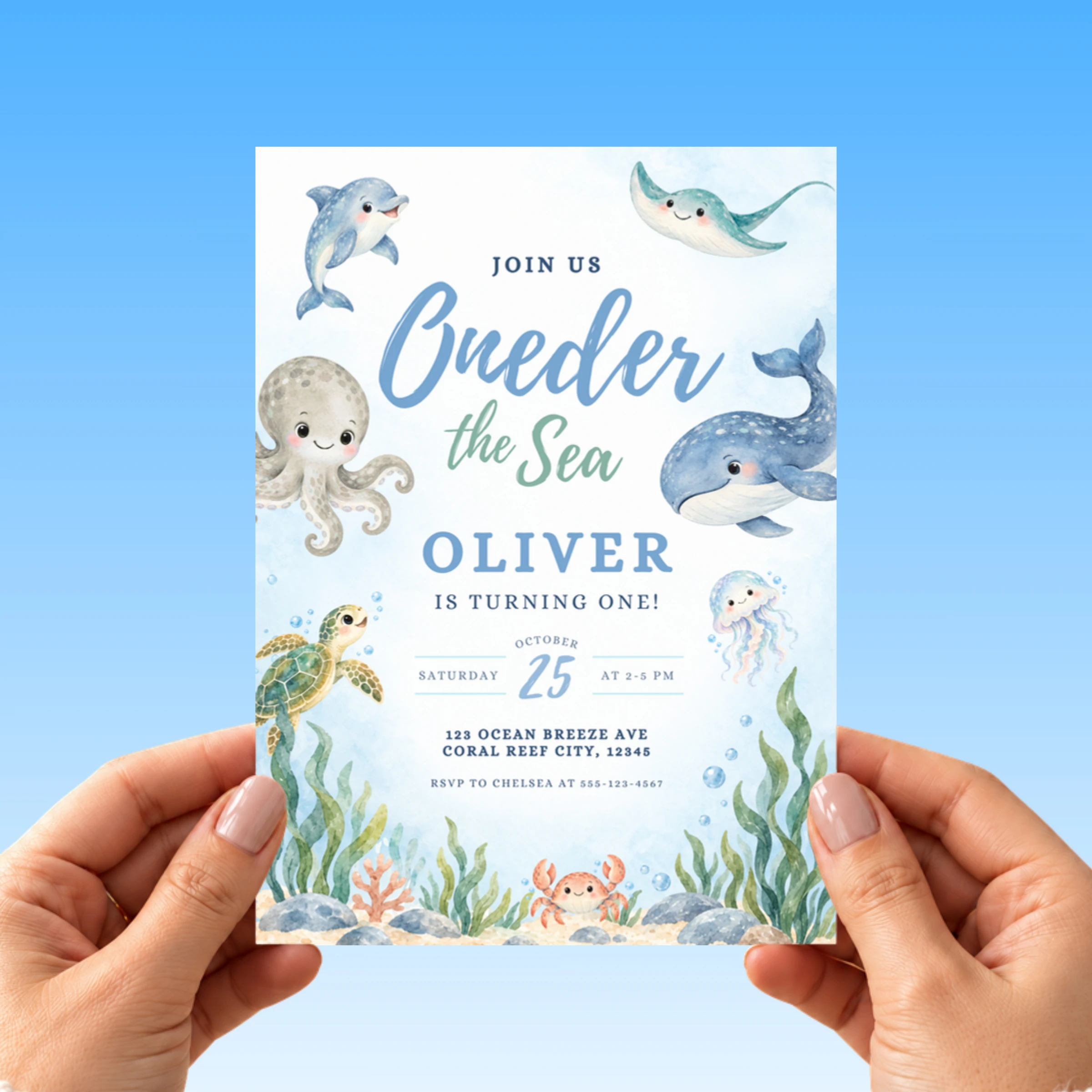
Oneder The Sea Watercolor 1st Birthday Invitation
Your phone buzzes with the group chat going wild the second you send out this oneder the sea 1st birthday invitation, and grandma texts back asking for a printed copy to put on the fridge. A big friendly whale, a dolphin, an…
How it works
Grab the template
Purchase from the official Plumblume Etsy shop.
Add party details
Personalize the editable text with your celebration info.
Send the fun
Download, share digitally, or print your finished invitation.
Digital invitation template · 25% off$7.99 $5.99
⚡ Instant download✎ Easy to edit♥ Secure Etsy checkout
Get it on Etsy ↗You’ll complete your purchase and receive your files securely through Etsy.What's included
- One editable oneder the sea birthday invitation, 5x7 inches, in an easy to use Canva template
- An animated mobile evite version to send by text message, WhatsApp, or email
- Print ready PDF output with crop marks and bleed for home or a print shop
- JPG output for sending the invitation digitally to your guest list
- Fully editable text, change the name, date, time, address, and RSVP line
- Editable text colors and fonts in Canva to match your party
- Basic phone editing supported, so you can personalize it on your phone tonight
- Unlimited edits and downloads with no expiration, reuse it for photos or thank you notes
What you can edit
- Child's name and age
- Party date, time and address
- RSVP line
- Text colors and fonts
Printing & sharing
- Print 5×7 cards at home on US Letter or A4 cardstock, two per sheet
- Or order prints at Walgreens, Staples, or FedEx Office
- Or send the image version by text, WhatsApp, or email. Instant and free
Not sure what to write?
Copy a line, paste it into the template, swap in your child's name.
Join us under the sea, [Name] is turning one.
Make a splash with us as [Name] celebrates a oneder-ful first year.
Dive in for [Name]'s first birthday ocean party.
Our little fish [Name] is turning one, come swim with us.
Why parents love it
- Animated mobile evite included. Most editable invitations only hand you a flat picture to send. This oneder the sea birthday invitation gives you a moving evite that grabs attention in a group text, and almost nobody in this theme offers it.
- Edit it tonight from your phone. You do not need a laptop or a print shop appointment. Type your details in the free Canva app and you have a card in minutes.
- One purchase, two versions. You get the printable card for the party table and the digital evite for the group chat, so you are not buying separate files.
- Reuse with no expiration. Edit it again for the dessert table sign, favor tags, or thank you cards in the same style.
Perfect for
- A first birthday party at the splash pad where mom pulls up the invite on her phone to text the whale and crab design straight to the family group chat.
- A backyard oneder the sea party where dad prints a few extra cards in the same blue watercolor design to hand out at daycare pickup.
- A grandparent who gets a printed copy in the mail and pins the whale and dolphin card to the fridge until the big day.
- A last minute planner who edits your child's name and the party date the night before and emails the finished invite straight from her phone.
✦ good to know
Tiny questions.
Easy answers.
The little things parents ask right before hitting buy. Still stuck? We’re one Etsy message away.
Ask on Etsy ↗Can I change the wording under the Oneder the Sea headline for my child's party details?
Yes, the smaller blue serif line under the script headline is fully editable in Canva, so you can update the name, date, time, and location to fit your own party.
Can I change the oneder the sea birthday invitation colors to match my party?
Yes. Every text color is editable in Canva, so you can warm it up or keep it soft.
Does the animated mobile evite really move?
Yes. The evite version has gentle motion that plays when your guests open it on their phone, which is what makes it stand out in a busy group text. You send it as a link or video through text, WhatsApp, or email, and there is nothing for your guests to download.
Can I edit this oneder the sea birthday invitation on my phone?
Yes. Basic phone editing is supported through the free Canva app, so you can type the name, the date, and the address right from your phone tonight. A tablet or computer gives you a bit more room, but a phone is enough to finish and send it.
Do I need to pay for Canva or design software?
No. The template opens in a free Canva account and there is nothing to install. Everything you need to change the wording and colors works on the free plan.
How do I print the invitation once it is done?
Download the print ready PDF with crop marks and print at home on cardstock, use a local print shop, or upload to an online printer. The file is sized 5x7 inches, and the JPG is best for texting or posting the invitation digitally.
Will I get a physical invitation in the mail?
No. This is a digital template for personal use only and no physical item will be shipped. You receive editable files instantly so you can print or send them yourself the same day.
Can I reuse this for other party items?
Yes. There is no expiration on your edits and downloads, so you can reopen the template for a matching welcome sign, favor tags, or thank you cards in the same style.
keep the party going