
 See the details →View details →
Joyful invites ✦ Instant downloads
First birthdays
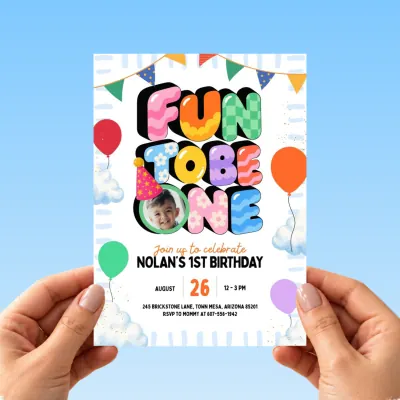
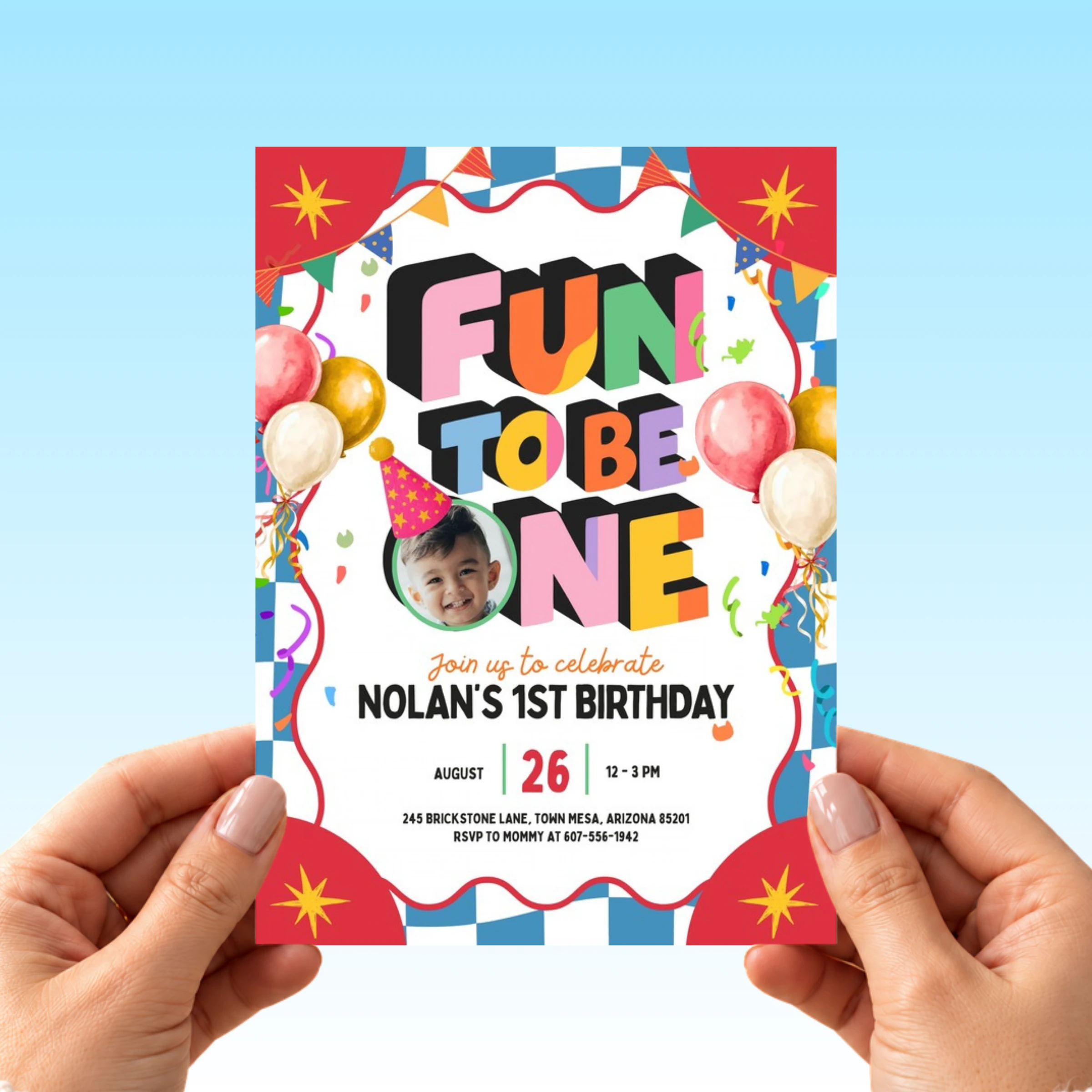
Retro Fun To Be One Photo Birthday Invitation
The cake is ordered, the balloons are picked, and now you need an invite that looks as loud and happy as the party you are planning. This fun to be one birthday invitation has a retro blue and white checkerboard border, red…
How it works
Grab the template
Purchase from the official Plumblume Etsy shop.
Add party details
Personalize the editable text with your celebration info.
Send the fun
Download, share digitally, or print your finished invitation.
Digital invitation template · 25% off$7.99 $5.99
⚡ Instant download✎ Easy to edit♥ Secure Etsy checkout
Get it on Etsy ↗You’ll complete your purchase and receive your files securely through Etsy.What's included
- One editable Fun to Be One Birthday Invitation, 5x7 inches, in an easy to use Canva template
- Print ready PDF output with crop marks and bleed for home or a print shop
- JPG output for sending the invitation digitally to your guest list
- A round photo frame inside the O of ONE for your baby's picture
- Blue and white checkerboard border, red star corners, 3D block letter headline, watercolor balloons, confetti and bunting
- Basic phone editing supported, so you can personalize it on your phone tonight
- Unlimited edits and downloads with no expiration, reuse it for photos or thank you notes
What you can edit
- Child's name
- Party date, time and address
- RSVP wording
- Your baby's photo in the O of ONE
- Text colors and fonts
Printing & sharing
- Print 5×7 cards at home on US Letter or A4 cardstock, two per sheet
- Or order prints at Walgreens, Staples, or FedEx Office
- Or send the image version by text, WhatsApp, or email. Instant and free
Not sure what to write?
Copy a line, paste it into the template, swap in your child's name.
It's fun to be one! Join us to celebrate [Name]'s 1st birthday.
Grab a party hat and join us, [Name] is turning one.
Balloons, cake and big smiles for [Name]'s first birthday.
One whole fun year of [Name]. Come party with us.
Why parents love it
- A retro look that is easy to spot: the checkerboard border and red star corners stand apart from the soft pastel stripes most first birthday cards use
- Your baby's face in the headline, with the photo frame right in the O of ONE so guests see who the party is for
- Big 3D block letters with a black shadow that stay clear on a small phone screen and on a printed card
- Edit it tonight from your phone in the free Canva app, no laptop or print shop appointment
- Reuse with no expiration for a welcome sign, food labels or thank you cards in the same retro style
Perfect for
- A park pavilion party with a picnic spread and a bright checkered tablecloth, where the invite sets the color scheme before anyone arrives
- A party room booked at a family restaurant, with a short printed stack for the relatives who still like a card in hand
- A first birthday in a community or church hall: send the JPG to a big group chat and print a few extras for the notice board
- A cake smash photo session the week before the party, with the printed card propped next to the cake for the photos
- A keepsake for the memory box: one printed copy with the real photo and the date
✦ good to know
Tiny questions.
Easy answers.
The little things parents ask right before hitting buy. Still stuck? We’re one Etsy message away.
Ask on Etsy ↗What kind of photo works best in the O?
A close up of your baby's face with plain, bright light works best, because the round frame is small. In Canva you drag the photo onto the frame, then double click it to move or zoom until the face sits in the middle.
Can I change the word ONE to another age?
No. ONE is built into the 3D block letter headline, so this card is made for a first birthday. The name, date, time, address and RSVP wording are all yours to change.
Is this design right for a boy or a girl?
It works for either. The blue, red, pink and yellow mix is bright without leaning one way, so you can type your child's name, add the photo and send it.
Can I change the checkerboard or border colors?
The text colors and fonts are editable in Canva. The checkerboard border, red star corners, 3D letters and balloons are part of the artwork and stay as shown, which keeps the retro look intact.
Can I edit this Fun to Be One Birthday Invitation on my phone?
Yes. Basic phone editing is supported through the free Canva app, so you can type the name, date and address and add the photo right from your phone. A tablet or computer gives you a little more room, but a phone is enough to finish it.
Do I need to pay for Canva or design software?
No. The template opens in a free Canva account and there is nothing to install. Changing the wording and adding your photo both work on the free plan.
How do I print the invitation once it is done?
Download the print ready PDF with crop marks and print at home on cardstock, use a local print shop, or upload it to an online printer. The file is sized 5x7 inches, and the JPG is the better choice for texting or posting.
Will I get a physical invitation in the mail?
No. This is a digital template for personal use only and no physical item will be shipped. You receive editable files instantly, so you can print or send them yourself the same day.
Can I make matching pieces for the party table?
Yes. There is no expiration on your edits and downloads, so you can reopen the template and turn it into a matching welcome sign, food labels or thank you cards with the same checkerboard border. It is an easy way to build a small party bundle from one purchase.
keep the party going