

 See the details →NewView details →
Joyful invites ✦ Instant downloads
Things that go
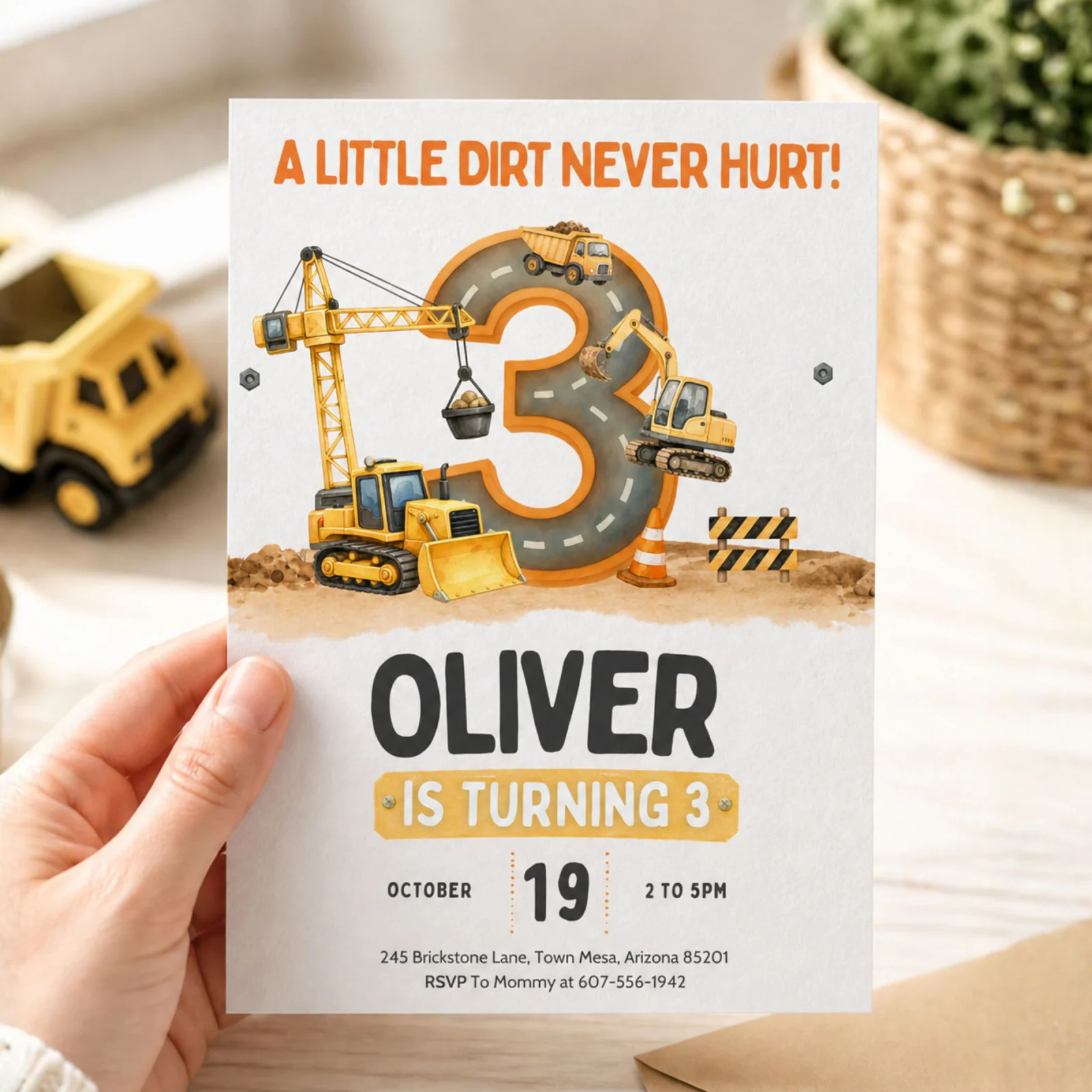
Construction Birthday Invitation — Dump Truck Party Invite
Construction Birthday Invitation, 3rd Birthday Invite Printable Template, Dump Truck Party Invite, Editable Canva Template, Boy 3 Birthday
Your kid's name in big block letters next to a yellow dump truck, a "3 & DIGGING IT" headline, party details neat and clear, ready to text the group chat in under 30 minutes. That is what this construction birthday invitation…
How it works
Grab the template
Purchase from the official Plumblume Etsy shop.
Add party details
Personalize the editable text with your celebration info.
Send the fun
Download, share digitally, or print your finished invitation.
Digital invitation template · 25% off$5.99 $4.49
⚡ Instant download✎ Easy to edit♥ Secure Etsy checkout
Get it on Etsy ↗You’ll complete your purchase and receive your files securely through Etsy.What's included
- One editable Canva template invitation, sized 5x7 inches, ready to
- personalize with your child's name, age, party date, time, address, and
- RSVP details.
- Lifetime template access through your Canva account. Edit it once for the
- 3rd birthday, save it, come back next year for the 4th birthday and reuse
- the layout.
- Instant download delivery. The Canva template link arrives in your Etsy
- account within minutes of checkout. No waiting, no shipping.
- Print and share flexibility. Export as a high-resolution PDF for home
- printing, JPG or PNG for text message and social media, or send the link
What you can edit
- Child's name and age
- Date, time, and party location
- RSVP name and phone number
- Any wording line, swap our puns for your own
Printing & sharing
- Print 5×7 cards at home on US Letter or A4 cardstock, two per sheet
- Or order prints at Walgreens, Staples, or FedEx Office
- Or send the image version by text, WhatsApp, or email. Instant and free
✦ good to know
Tiny questions.
Easy answers.
The little things parents ask right before hitting buy. Still stuck? We’re one Etsy message away.
Ask on Etsy ↗How do I edit the construction birthday invitation after I buy it?
After checkout, sign into your Etsy account on a desktop or mobile browser, go to your purchases, and click the download. You receive a Canva template link. Open the link in any browser, sign into a free Canva account, and the 3rd birthday invite is ready to edit. Click text to type, save when done.
Can I edit this invitation on my phone?
Yes. Download the free Canva mobile app, open the template link from your phone, and edit anywhere. The 5x7 layout works on phone, tablet, and desktop.
Do I need to pay for Canva to use this template?
No. The free Canva plan does everything you need to edit this 3rd birthday construction invitation, including changing text, downloading as PDF or JPG, and sharing as a digital invite. Canva Pro is not required.
What size is the invitation and what paper should I print on?
The invite is sized 5x7 inches. Print on white or kraft cardstock for the best look, or send the file to an online printer like Walmart Photo, Staples, or VistaPrint. Most home printers handle 5x7 cardstock without issues.
Can I change the age from 3 to 4 next year?
Yes. The template is fully editable, including the age number. Change the 3 to a 4, update the date, and the same construction theme invite works for the next birthday. This is one of the best reasons parents pick this format.
Will the colors look exactly the same when I print as on screen?
Colors usually print very close to what you see on screen but can vary slightly based on your printer, ink, and paper. For the closest match, print a test copy first or use a professional photo printer that calibrates color.
Can I share this digitally instead of printing it?
Yes. Download the edited invite as a JPG or PNG and text it, email it, or post it in a private group chat. Many parents now skip paper invitations entirely and send the digital file as a phone-friendly text message invite.
Do you have matching items for the rest of the party?
Construction theme matching items are commonly available in this niche, including thank you cards, welcome signs, cupcake toppers, and food labels. Check the shop for matching 3rd birthday construction items, or message the shop to ask if a specific matching item is available before you buy.
What if I make a mistake while editing?
Canva auto-saves every change, but it also lets you undo any edit. If you mess up badly, click File then Version History and roll back to an earlier save. You cannot break the template. Worst case, message the shop and ask for a fresh copy of the link.
Is this an instant digital download or do you ship a physical card?
This is a digital download only. No physical product is shipped. You receive a Canva template link, you edit it yourself, you download the finished file, and you print or share it however you want. That is what keeps the price low and the delivery instant.
keep the party going
You might also love...
See the details →NewView details → See the details →PopularView details →
 See the details →Fast favoriteView details →